Can AI do concept-level design thinking? I tested Claude Design on a real brand problem and I was delightfully surprised

Not a features review. I set up a hypothetical design exercise based on a brand tension I know well — and asked Claude to think through it with me. What came back was delightful as I got to fully engage in the pre-execution phase of design - the type of design conversation I was looking for.
There's a problem I keep running into when designing with others. What happens is, I assign a designer a task, it seems that there is a tendency to jump into Figma, and on the next meeting it comes back as something beautifully executed — but conceptually adrift. Not because the execution is wrong, it’s because the thinking never happened. And often times it looks well executed, so it’s hard to express that there is something off. Not knowing how to properly communicate this, I often passively reject it or try to re-engineer it so that something works. Either way it results in the hurt feelings of the designer. I’ve tried to be encouraging and try to make an exercise of trying different styles designs or trying to have the designer make a style guide for themselves (as a way to be more self aware so they don’t push their own preferences on others) but it gets blown off as “fun” and not real work.
As someone who has not had experience working and leading teams in a professional design agency or in house team, it’s hard to know what to do. My options are to either be the one to build up the skills and do the thinking, have a more experienced designer work on projects with me, or work with a motivated designer to find our way of thinking together. All of these have challenges for various reasons. After trying to make option 2 and 3 work without success, I’ve decided that it’s faster and more interesting for me to try to figure out how to do the thinking. And so I dove deeper into trying to learn how to think and also how to present the thinking to get to faster collaborative decision making.
I've tried to describe this gap I’ve been experiencing but I haven’t been able to successfully get my meaning across. Part of the reason is structural — the thinking phase is invisible, hard to share, and requires a conversation partner who is open minded and curious about the project or process. Also people tend to shut their minds off when it comes to articulating visual design because it’s a language most don’t know how to speak. And surprisingly, it’s the same for designers, learning how to speak about their craft is another skill on its own. It’s like asking a native speaker to explain their language to you with grammar, it’s not how they learned it. And they get insulted if you ask them to watch videos.
I’ve found that the fastest way to learn is though watching video courses - Domestika and Skillshare offer concise, clear courses with a variety of topics, RGD holds really good quality conferences, provides resources and fosters community. Last year I experimented with getting a tutor to explain their processes get feedback and share resources. It really speeds up the learning process.
My newest experimentation has been AI, I decided to test whether it could play the role I was looking for and so I set up a hypothetical brand exercise based on a tension I know well from working in mobile apps, and brought it to Claude Design to see what would happen.
The problem I brought it
Here's the setup: imagine a consumer app with two distinct visual identities that have never quite made peace with each other.
The brand identity is a bold, saturated gradient — purple into magenta into coral. High energy, immediately recognizable, built for an app icon and a CTA button. It says: tap me.
The content aesthetic — the templates, the editorial blog, the seasonal campaigns — lives in a completely different register. Cream paper, kraft textures, washi tape, script fonts, pressed florals. Warm, handmade, unhurried. It says: linger here.
Put them on the same marketing page and they fight. The gradient looks loud next to the content; the content looks dusty next to the gradient. Neither wins. This is a real and common problem for apps that have a strong brand identity but whose product output looks nothing like that brand.
The brand wants to shout. The content wants to whisper.
I described this tension to Claude, uploaded some reference images showing both aesthetics, and asked it to help me think through how to resolve it on a marketing page.
It didn’t jump to solutions, it asked questions first
Before generating anything, Claude asked clarifying questions. Was I redesigning the full brand or working within an existing system? What surface was I focused on — a homepage, a blog, an App Store page? And crucially: what did I want to be able to have a conversation about at the end of this?
That last reframe is the right question. It's what a good design director asks before a brief. It forced me to be precise: I wasn't redesigning the brand, I was trying to understand how these two aesthetics could coexist on a marketing page without one drowning the other.
Once I clarified that, the conversation got much sharper. Claude named the tension clearly — two brands in one room — and then did something I didn't expect: rather than proposing a solution, it mapped three distinct strategies for holding the tension, each with its own logic.
Three strategies, not one answer
This is the part I found most valuable. Instead of converging on a single recommendation, Claude gave me three named positions along a spectrum — each a coherent philosophy, not just a variation in execution.
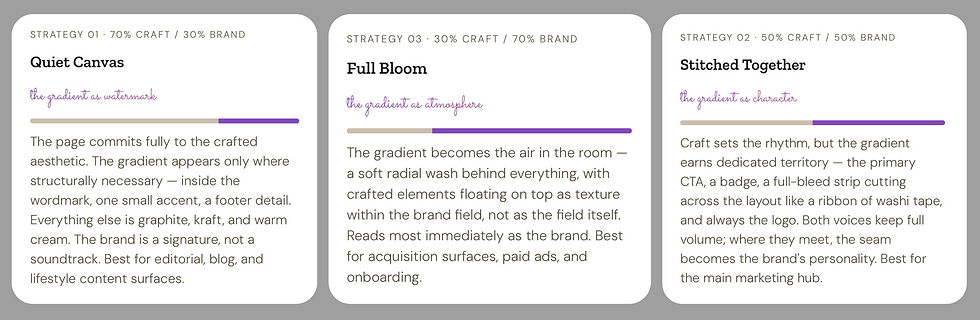
It then made a recommendation — lead with Stitched Together as the default, use the other two for specific contexts — and gave six concrete rules that would make all three feel like one coherent brand across surfaces.
The whole thing was titled: Two brands in one room: the gradient and the craft.
What this showed me about AI and design thinking
I want to be careful here, because I think there's a wrong lesson to take from this.
The output isn't a finished design direction. The mock pages Claude generated would need real images, real type choices, a real designer making real calls in context. The execution is illustrative, not final.
But the conceptual scaffolding is sound. The tension is named. The strategies are distinct enough to be debatable. The recommendation has reasoning behind it. That's not nothing — that's actually the hardest part of the pre-execution phase to get on paper.
AI didn't replace the design thinking. It made the design thinking visible — and shareable.
When I imagine bringing something like this to a design team, I'm not handing them a solution. I'm handing them a framework for a conversation. Here are three ways to hold this tension. Here's what each one prioritizes. Here's where I'd start. That's the brief that should exist before anyone opens Figma — and it's the brief that most teams never write.
A new shape for the pre-execution phase

The design skills that matter most in this workflow are upstream of execution — knowing what problem you're actually solving, knowing how to frame a tension, knowing what a good strategy looks like versus a vague one. AI can generate options. It can't yet tell you which option is right for your brand, your users, your moment. That judgment is still yours.
But the gap between "I have a design problem" and "I have a framework to think about it" just got meaningfully smaller. For designers working alone, for small teams without a dedicated strategist, for anyone who's ever felt like the concept phase happens too fast or not at all — that's worth paying attention to.
Comments